
When something is wrong, it is reported the same minute
Heavy rain that stopped an outdoor round, a forced storeroom door, a fallen tree across the driveway — the guard files it from the app, and it does not sit in a paper logbook until morning.
Everything a report needs, captured on the spot
Guards file from the same app they run their patrol round in — no separate tool, no re-typing a paper note back at the guardhouse.
Location, subject and reporter
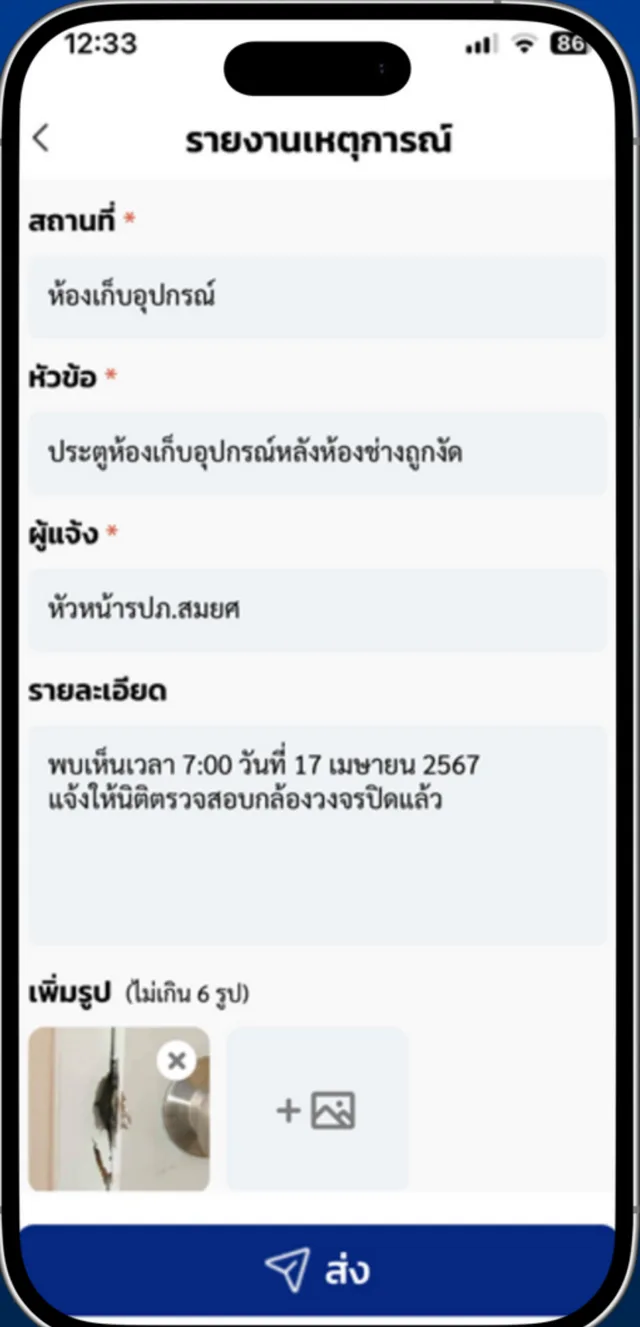
Every report records where it happened, what it is about, who filed it and a free-text description of what was found — so nothing has to be reconstructed later.
Up to 6 photos as evidence
Guards attach up to six camera photos to a report, turning a written note into evidence the juristic office can act on without a site visit.
Delivered to the juristic office
Reports arrive in Urbanice Niti or Guard Web the moment they are filed, so the office sees the incident while it is still happening rather than at the morning handover.
Pushed to Telegram automatically
The same report is posted to the project's Telegram group at the same time, so the people who need to respond are notified without anyone forwarding it.
Searchable report history
Every report filed is kept and searchable, giving the juristic office an auditable record to review when a recurring problem or a dispute needs evidence.
Filed from the patrol app
Incident reporting is part of i-Check, so a guard already on a round can file a report without leaving the checkpoint or switching apps.
From what the guard sees to what the office can act on
Four steps, all inside the app the guard is already carrying — no radio call to relay, no paper note to transcribe at the end of the shift.
- Step 1
The guard opens a report
From the incident screen in the app, the guard starts a new report the moment something is found — during a round, at the guardhouse, anywhere on site.
- Step 2
Fill in what happened
Location, subject, reporter and a free-text description of what was found, with up to six camera photos attached as evidence.
- Step 3
Send it in one tap
One send delivers it to the juristic office through Urbanice Niti or Guard Web and posts it to the project's Telegram group at the same time.
- Step 4
The office reviews and files it
The office opens the full report with its photos, acts on it, then archives it into the record or removes it if it was filed in error.
Every report, opened in full and kept on file
What the guard sends arrives complete — the office does not have to call back to ask what happened or where.
Open the full report
Subject, location, date and time, who filed it, the written description and every attached photo — all in one detail view, without a site visit.
Review the report history
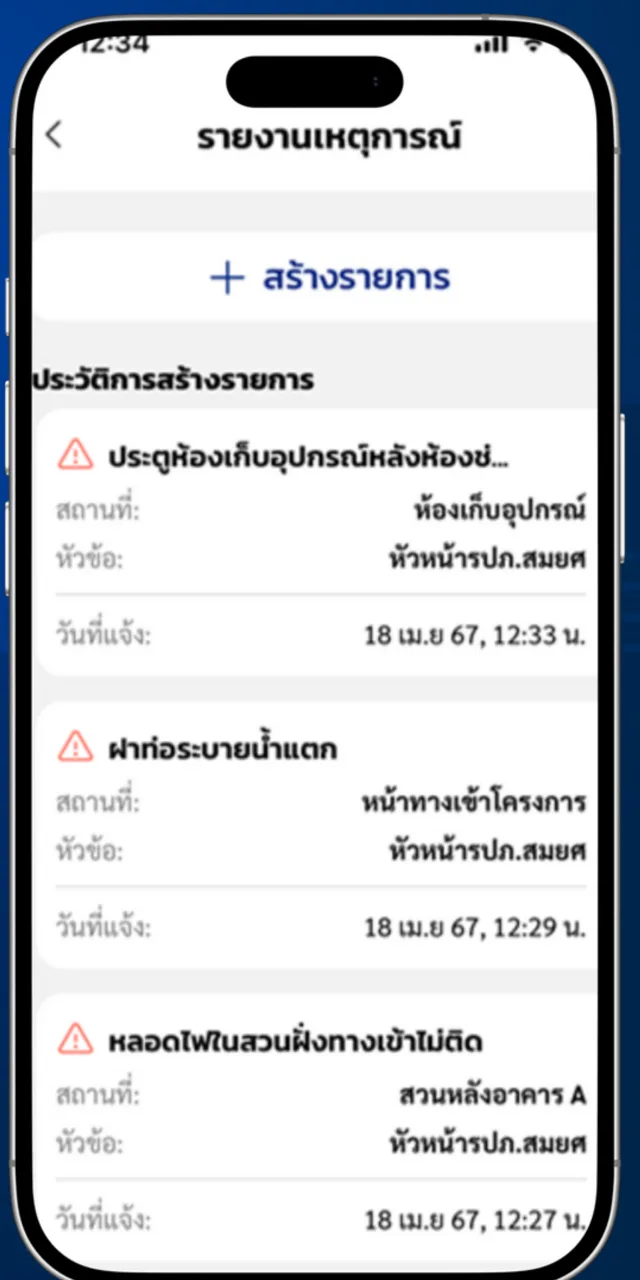
Reports are listed newest first with their subject, location and time, so a recurring problem is visible as a pattern instead of a stack of separate notes.
Archive into the record
A handled report is filed into the project's record, giving the juristic office evidence to produce later if a dispute or an insurance claim needs it.
Remove a mistaken entry
A report filed in error can be deleted from the office side, so the history stays an accurate account of what actually happened.
No more waiting for the morning handover
- Know about incidents the minute they are found, not at the next shift change
- Act on photo evidence instead of a second-hand description
- Reach the juristic office and the Telegram group in one step
- Keep an auditable history of every report for review or dispute
- Replace the paper logbook with a record that can actually be searched
Ready to get incidents reported the minute they happen?
Talk to our team about incident reporting for your project's security team.
Frequently asked questions
Who files an incident report?
The on-duty security team. Guards file a report from the i-Check app with the location, subject, reporter, a description of what was found and up to six photos.
Where does the report go?
It reaches the juristic office through Urbanice Niti or Guard Web and is pushed to the project's Telegram group at the same time, so nobody has to forward it manually.
How many photos can be attached?
Up to six camera photos per report, so an incident can be documented as evidence rather than described from memory.
Can past reports be reviewed?
Yes. Every report filed is kept as a searchable history, so the juristic office can review a recurring problem or produce evidence when a dispute needs it.
Is incident reporting a separate product?
No. It is part of i-Check, the guard patrol system, so a guard already running a round can file a report without switching apps.